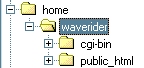
Perlshop 4 web server software is based upon a set of files that are placed on your web server.
These files are grouped into two general categories:
On a typical web server, these two categories of files are stored under two different directory structures. The following
example is common for a Unix web server with multiple users. In this example, the user account directory is named
waverider. Files from the first category are stored under the /home/waverider/cgi-bin directory, and the files
from the second category are stored under the /home/waverider/public_html directory:
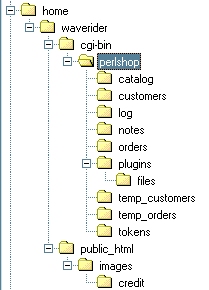
This section of the document describes a traditional directory configuration that can be used by any version of Perlshop. All of the Perlshop CGI files are stored under the /home/waverider/cgi-bin/perlshop directory. The Perlshop catalog pages are stored under the /home/waverider/cgi-bin/perlshop/catalog directory and are not available for direct access by web clients.
This architechture makes for simple installation and configuration, but has disadvantages where web search engines are concerned (see the document Dancing with Search Engines for more details on this topic).
See the document Preparing Your Web Server for simple instructions on creating this directory structure on your own web server prior to Perlshop installation.
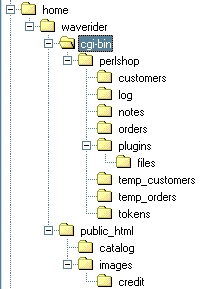
This directory architecture is identical to that shown in the previous section, save that it moves the catalog web page directory out of the cgi-bin area and into the public_html area. This makes the catalog web pages available to web clients like search spiders.
The problem with this directory architecture is that it is still not possible to provide your customers with direct URLs to your catalog pages. This is because the catalog pages contain Perlshop data tags embedded within the HTML, and these tags must be processed by Perlshop before they can be displayed in a web browser.
There are several techniques that can be applied to your catalog pages that can resolve this issue.
The document Dancing with Search Engines describes a JavaScript mechanism that can be added to each catalog web page. This JavaScript code will be executed by the browser as the page is being loaded, providing automatic URL redirection for each catalog page.
Example: If a web client requests a standard catalog page URL like this:
their web browser will be automatically redirected to a Perlshop like this:
This technique works well for all web browsers and for many search engines. Increasingly, however, search engines like Google do not like working with URL redirection. A more sophisticated approach is needed for modern web sites.
This technique works only with the Apache web server. It has been used successfully with Apache versions 1.2 and 2.0. No changes to your catalog web pages are required in order to use this technique.
This technique requires that you add a custom Apache .htaccess file to the catalog html directory on your web server.
In the case of the example directory structure shown above, the full name of this file would be
Action text/html /cgi-bin/perlshop/perlshop.cgi
This command instructs Apache to process all files of MIME type text/html in that directory through the program
Please note:
Example 1: If a web client requests a standard catalog page URL like this:
Apache will respond as if the following URL had been requested:
Example 2: If a web client requests a PSDBI catalog page URL like this:
Apache will respond as if the following URL had been requested:
This technique works only with the Apache web server. It has been used successfully with Apache versions 1.2 and 2.0.
This technique requires that you add a custom Apache .htaccess file to the catalog html directory on your web server.
In the case of the example directory structure shown above, the full name of this file would be
Options +ExecCGI
AddHandler cgi-script html
The first command enables CGI execution inside your catalog web page directory, which is something Apache would not normally do. The second command instructs Apache to process all files with an html suffix in that directory as though they were CGI scripts. Together, these commands tell Apache to treat your catalog web page files just like any other web server CGI program.
Please note:
In order to use this technique, the first line of each catalog html page must contain a Unix instruction that tells the server how to execute that file, and the second line of each catalog web page must be blank. For example:
#!/usr/local/bin/perl /home/waverider/cgi-bin/perlshop/perlshop.cgi <html> <head> <title>Test Page - Apache</title> </head> <body> <h1>Test Page - Apache</h1> Your order ID is !ORDERID!.<br> </body> </html> |
The first line of the file contains two parts. The first part is your web server's path to its Perl installation. This part will be the same as in the first line of your perlshop.cgi file. The second part of the command is the full file name of your perlshop.cgi file.